Filmm | Video Effects + Color
- 3.8
- Rating
- 500.00K
- Installs
- Free
- Price

 Analysis by App-foxy
I approached Filmm as a quick, style-focused video editor rather than a full production studio. That distinction matters. The app sits in the Video Players & Editors category and is built around textures, filters, and light leaks, so its appeal is immediate: take an ordinary clip and give it a more deliberate visual mood without spending a long time learning a complicated timeline.
My first impression was that Filmm makes the most sense when I already know the feeling I want. It is useful for a warm travel clip, a rough-looking music snippet, a soft memory, or a short social post that needs more character. I would not choose it as my main tool for detailed cutting, audio mixing, captions, or a carefully organized multi-scene project. Its strength is visual treatment, and the experience becomes clearer once I stop expecting it to replace a complete editor.
The app is free to install, with optional in-app purchases ranging from under a dollar to around ten dollars per item. It is rated for Everyone, runs on Android seven or later, and the current version is 1.0.30. Filmm is developed by Filmm, and its audience is already fairly broad, with over 500 thousand installs and an average rating of 3.8 from around 3.5 thousand ratings. Those figures suggest a useful but not universally loved tool, which matches my experience: the concept is approachable, while the best results depend on choosing the effect carefully.
You May Also Like

 Blood Strike: 2.5 Anniversary
Blood Strike’s Loadouts Turn Every Drop Into a Tactical Gamble
A close look at Blood Strike’s custom loadouts: how fast access to signature weapons reshapes its battle royale rhythm, rewards preparation, and narrows the gap between fights.

 Pandora - Music & Podcasts
Pandora’s Music Is Easy to Start, but Harder to Recover
Pandora’s strength is its low-effort path from a seed to a station. Its weak spot is how much confidence it asks you to place in connection, setup, and quiet recovery.

 8 Ball Pool
 Is Built on Rivalries, Rematches, and Routine
A close look at the rivalries, rematches, shared routines, and unanswered safety questions that turn a quick pool match into a persistent mobile community.

 Samsung Music
’s Quiet Strength Is Playing What You Already Own
Its reach comes less from spectacle than from dependable access to a personal library. That simplicity is both the app’s strongest retention engine and its ceiling.

 AccuWeather: Weather Radar
AccuWeather Review: A Quick, Clear Forecast for Everyday Decisions
For everyday plans, the best forecast is the one you can understand quickly. AccuWeather makes rain timing, radar, and local conditions easy to act on, with a few trade-offs.

 Hill Climb Racing
Why Hill Climb Racing Still Turns Crashes Into One More Run
A tiny car, a bumpy hill and one more upgrade: Hill Climb Racing keeps resurfacing because its simple chaos makes every near-miss feel personal.
More From Our News Desk
View All News


How Filmm feels when connectivity becomes part of the workflow
When connectivity becomes part of my editing routine, I find it helps to plan the creative choice before I start browsing: decide whether the clip needs a color shift, texture, or a touch of light, then compare only a few suitable looks. That keeps a brief session focused and makes slow previews less disruptive. The next section looks at why this deliberate approach works especially well for short edits on a phone.
Network-dependent moments can interrupt a simple creative idea
Editing a short video often feels like an offline task: I have a clip on my phone, I want to change its appearance, and I expect the process to stay between the camera roll and the editor. In practice, apps with visual libraries can involve connectivity at different points, especially when browsing or loading creative material. That is where Filmm can feel less predictable than a basic camera filter.
I found it helpful to separate the creative decision from the network-dependent step. Before opening the effect choices, I decide whether I want texture, color change, or a light leak. That keeps me from repeatedly browsing without a clear target. If a preview takes time to appear, I am not wasting the moment trying every option in sequence. I can wait for the relevant group, compare a few looks, and move on.
This is particularly important when I am outside. A short clip recorded during a walk may be ready to edit while I am on a weak mobile connection, but visual browsing can become less pleasant in that situation. I would rather make a rough selection later than burn time tapping through a library that is slow to respond. Filmm is most comfortable when I have a stable connection and enough patience to inspect the choices instead of treating it like an instant one-tap camera.
There is also a creative advantage to slowing down. The first effect that looks dramatic is not always the one that serves the video. Textures can add atmosphere, but too much surface detail can hide faces or make a clean scene look muddy. Light leaks can suggest warmth or nostalgia, yet they can also pull attention away from the subject. I use the preview as a comparison tool, not as proof that an effect belongs in the final export.
Why the app suits short mobile sessions
Filmm fits the way I often use my phone: I capture something quickly, review it later, and want a visible improvement without building a full edit. A café clip, a sunset, a pet doing something funny, or a few seconds from a weekend trip can all benefit from a consistent visual treatment. The app’s focused set of visual ideas makes it easier to begin than a professional editor filled with timelines, tracks, and technical panels.
My practical workflow is simple. I choose the clip, identify its main subject, and then test the effect against that subject rather than judging the edges or background first. If the video contains a person, I check whether the texture competes with skin and eyes. If it shows scenery, I look for whether the filter preserves sky detail and color separation. For a night recording, I am especially cautious with overlays because extra visual noise can make an already dark image feel less clear.
One useful habit is to compare the treated clip with the original before committing. A strong effect can be impressive in isolation, but the original reveals whether the edit actually improves the story. I often prefer a restrained treatment for clips I want to watch repeatedly. A more obvious light leak may work for a playful post, while a subtle texture is usually better for a memory I want to keep looking natural.
The app is also approachable for someone who does not think of themselves as an editor. I would recommend it to a friend who wants a recognizable style but does not want to study color curves or learn a desktop program. The learning curve is mainly visual judgment: understanding when an effect supports the clip and when it becomes the entire clip.
A realistic everyday scenario
Imagine recording a short video during a family outing. The footage is technically fine, but the lighting is flat and the scene feels ordinary. Later, I would use Filmm to give the clip a warmer, more personal tone, then check the faces and background before saving it. If a light leak crosses the important moment, I would choose a different treatment rather than accepting the first attractive preview.
That workflow shows where the app earns its place. I am not trying to remove a complicated object, repair shaky footage, synchronize several audio sources, or build a long story from dozens of clips. I am trying to make one small video feel more intentional. For that job, a focused effects app can be faster and less intimidating than a general editor.
What happens when a connection fails during editing
The most frustrating moment with any visually driven app is losing momentum. If a library or preview depends on a connection at the moment I am making a decision, a weak signal can turn a quick edit into a stop-and-start session. I handle that by avoiding unnecessary experimentation when I am travelling. I select a small number of likely styles, wait for the interface to settle, and keep the rest of the edit uncomplicated.
I also avoid assuming that a failed preview means the video itself is damaged. My first recovery step is to return to the clip and try the action again rather than repeatedly tapping the same control. If the problem continues, I save the original video safely and postpone the visual pass. That matters because the original is the fallback: I can revisit the edit later without having lost the source material.
For important clips, I recommend treating the final save as a separate stage. I watch the result once before leaving the app, paying attention to the beginning and end, where an effect can feel more obvious. I also keep the original until I am satisfied with the exported version. This is not unique to Filmm, but it is especially sensible when the app’s main purpose is appearance rather than detailed project management.
Someone who needs guaranteed continuity during a flight, in a basement, or in an area with unreliable reception should plan around that limitation instead of relying on a last-minute edit. I cannot present Filmm as a dependable no-connection editor. The safer approach is to prepare clips beforehand, use the app when the relevant content is available, and avoid making it the only copy of a meaningful recording.
Being careful with mobile data
Even when the app is free to install, a visual editing workflow can involve more than the initial download. Browsing effects, loading previews, and saving a finished video may all be worth considering when I am using mobile data. I prefer to do exploratory browsing on Wi-Fi and reserve cellular use for a specific edit I have already planned.
That approach also improves creative discipline. Instead of opening every category and trying effects randomly, I decide whether the clip needs softness, grain-like character, a color shift, or a flash of light. Then I test only the options that match that goal. It reduces unnecessary loading and makes the final choice easier to explain: the effect is there because it supports the mood, not because it happened to be the newest preview on screen.
Storage is another practical concern with any video app. I keep the original clip until I have checked the finished version, but I do not create multiple copies of every experiment. If I am testing several looks, I compare them in the editor first and save only the version that I genuinely prefer. This is a small habit, yet it prevents a phone gallery from filling with near-identical exports.
Filmm’s optional purchases also deserve a deliberate approach. Since individual items can cost from $0.99 to $9.99, I would not buy anything simply because a preview looks striking for a few seconds. I would first decide whether I will use that style repeatedly and whether it solves a real need in my editing routine. A person who only wants occasional color changes may be perfectly satisfied with the free experience, while someone building a consistent visual identity may see more value in a carefully chosen purchase.
Where it beats ordinary alternatives, and where it does not
Compared with a phone’s built-in editor, Filmm offers a more expressive visual direction. The standard editor is usually better for basic trimming and quick corrections, but it may not provide the same emphasis on textures, filters, and light leaks. When I want a clip to feel stylized rather than merely shorter, Filmm is the more interesting first stop.
Compared with a full mobile editor, however, the trade-off changes. A broader editing app is generally the better choice when I need precise timing, several layers, titles, voice-over, detailed audio control, or a structured sequence. Filmm is quicker when the visual finish is the main job, but it is not the tool I would build a complex project around.
There is also a difference between a filter app and a color-correction tool. Filmm is aimed at a recognizable look, not at painstakingly matching two cameras or correcting every exposure problem. If the source footage is badly lit, a decorative overlay may disguise the issue without fixing it. I would correct the basic problem elsewhere when accuracy matters, then use Filmm only if the added style still serves the clip.
Who should use it and who should skip it
I think Filmm is a good fit for casual creators, social video users, travellers, and anyone who wants a quick visual signature without a technical editing course. It is also useful for people who enjoy comparing moods: the same clip can feel softer, rougher, brighter, or more nostalgic depending on the treatment. The app encourages that kind of visual experimentation without demanding a large production plan.
I would steer away from it if your priority is a complete editing workspace. It is not my recommendation for documentary-style projects, detailed tutorials, business videos with precise branding, or edits where audio and timing matter more than surface style. I would also be cautious if your editing usually happens in places with poor connectivity and no opportunity to prepare beforehand.
My strongest tip is to choose the subject before choosing the effect. A texture that looks excellent over an empty wall may obscure a face. A light leak that adds energy to a moving street scene may cover the exact detail you want people to notice. Testing the effect at the most important moment, rather than only at the opening frame, produces much more reliable results.
My connectivity verdict
Filmm is a focused, approachable way to add visual personality to short videos. I like it most when I have a clear mood in mind, a manageable clip, and a stable enough connection to browse without frustration. Its emphasis on textures, filters, and light leaks gives it a distinct role beside ordinary phone editing tools, even though that focus also limits it as a complete production app.
The network question does not erase its usefulness, but it changes how I would use it. I would explore and prepare when connected, avoid depending on it during an important offline moment, and keep original footage until the final result has been checked. That small amount of planning makes the experience smoother and protects the clips that matter.
With an Everyone age rating and a free starting point, it is easy to try without making a major commitment. The optional purchases are worth considering only after I know which visual treatments I will actually reuse. Overall, I recommend Filmm to someone who wants fast, expressive finishing touches and understands that it is a style tool first. If your goal is mood rather than complex production, it is a practical app to keep on your phone.
FAQs for Filmm | Video Effects + Color
01What is Filmm | Video Effects + Color, and what can I use it for?
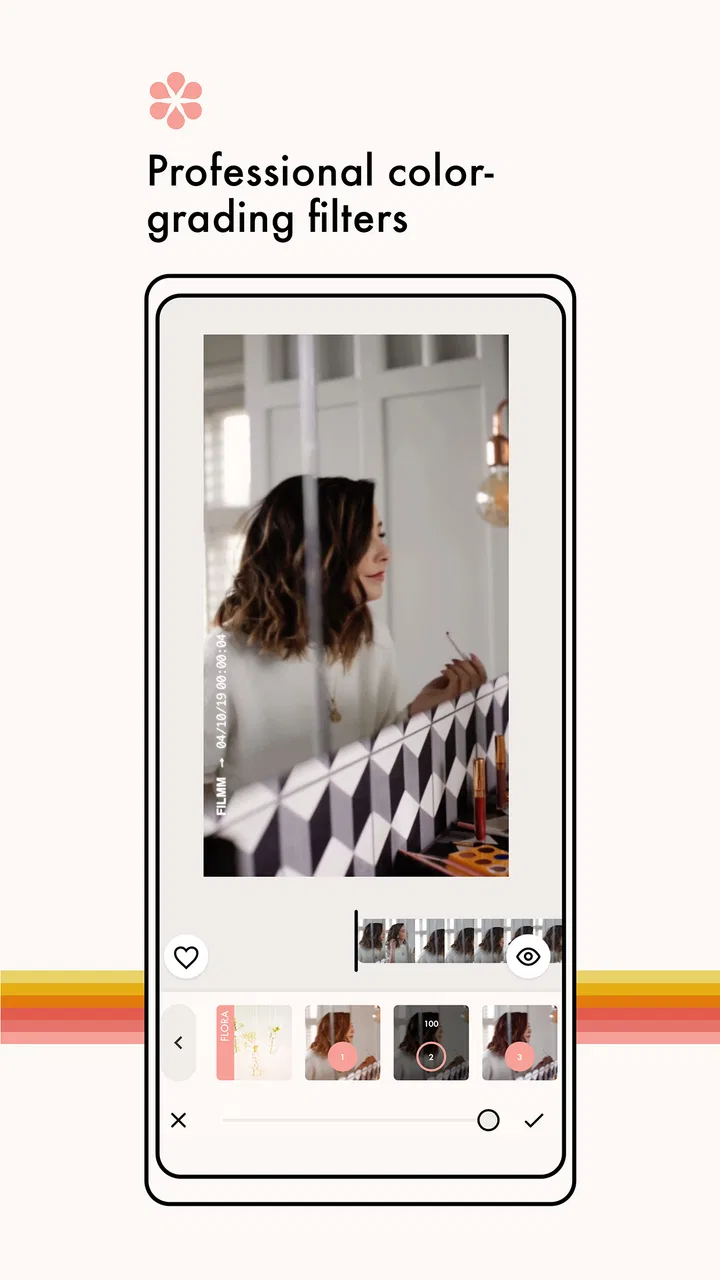
Filmm | Video Effects + Color is a mobile video-editing app focused on cinematic filters, analog-inspired effects, color adjustments, dust, grain, light leaks, borders, and other visual overlays. After testing its editing workflow, I found it especially useful for creating short social-media clips, travel videos, music edits, and nostalgic-looking footage without needing advanced desktop software. It is designed for quick creative edits rather than full professional post-production.
02Is Filmm | Video Effects + Color free to download and use?
The app can generally be downloaded for free, but some of its effects, filters, editing tools, or export options may be restricted to premium users. The available features and subscription terms can change between app versions and regions, so it is worth checking the in-app purchase screen before starting a project. Users should also review whether a free trial automatically changes into a paid subscription after the trial period ends.
03Can I use Filmm to edit videos already saved on my phone?
Yes, Filmm is primarily intended for editing media imported from your device, although the exact import and project options may depend on the current version and your phone’s operating system. You can typically select a video or photo, apply visual effects, adjust the overall look, and preview the result before exporting. Make sure the app has permission to access your photos and videos, and remember that high-resolution files may require additional storage and processing time.
04Does Filmm add a watermark to exported videos?
Whether an exported video includes a watermark can depend on the selected tool, account status, subscription plan, or current app policy. Before completing an important edit, check the preview and export screen for any branding or limitations. Premium access may remove certain restrictions, but you should verify the exact terms in the app rather than assuming every effect or export option is watermark-free. Exporting a short test clip is a practical way to confirm the result.
05Is Filmm suitable for beginners, and does it work well on every phone?
Filmm is approachable for beginners because its main controls are visual and centered on selecting effects, adjusting intensity, and previewing changes in real time. However, performance can vary depending on your device, available storage, video resolution, and the number of effects applied. Older phones may experience slower previews or longer exports. For the smoothest experience, use an updated device, close unnecessary apps, and keep enough free storage for temporary project files.
Pros
- Wide range of cinematic filters for quick video transformations.
- Color tools help create consistent looks across multiple clips.
- Effects can be previewed before exporting the finished video.
- Suitable for both casual edits and polished social media content.
- Simple interface makes creative editing accessible to beginners.
Cons
- Some premium effects and tools require a subscription or purchase.
- High-resolution exports may take longer on older devices.
- Heavy effects can increase battery use during editing sessions.
- Limited advanced controls compared with professional video editors.
- The app may need considerable storage for downloaded effects and projects.

Filmm | Video Effects + Color
Gallery